What is SSD? Complete Guide to Solid-State Drives
Introduction to SSD
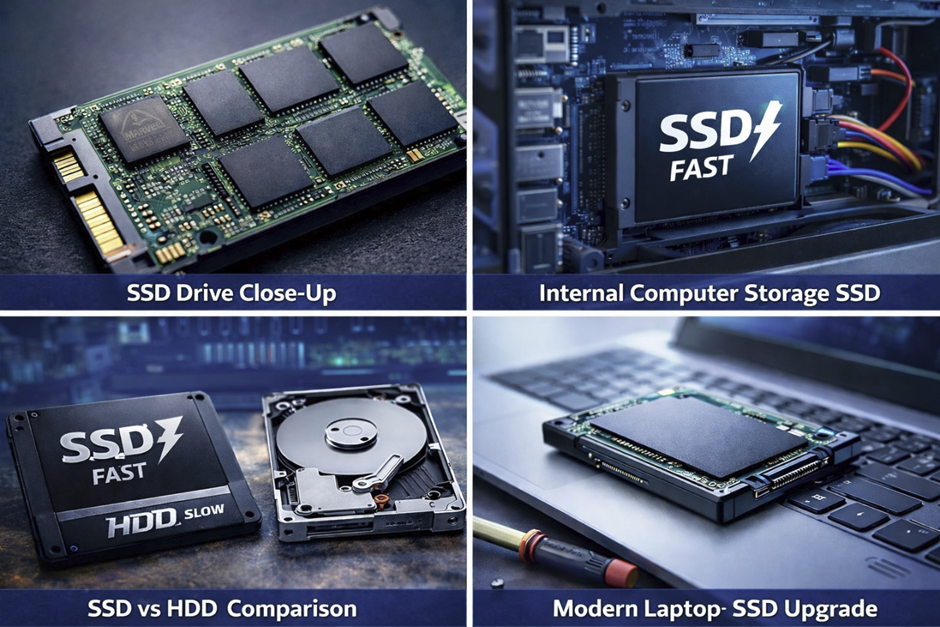
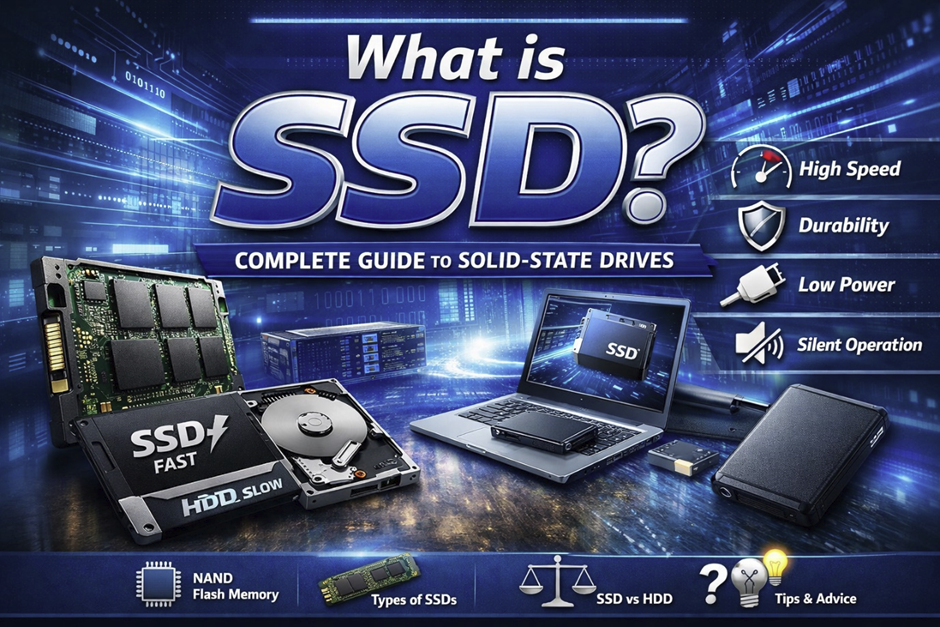
Solid-State Drives (SSDs) have changed the way modern computers store and access data. Unlike traditional hard drives, which depend on mechanical parts, SSDs use flash memory to deliver much faster performance and better resistance to physical wear. SSD adoption started gaining real momentum around 2008, when companies such as Samsung and Intel began producing consumer-grade drives on a larger scale. Since then, SSDs have become common in computers and devices running Windows, Linux, and MacOS, where they can noticeably improve everyday tasks, from web development to gaming. The growing need to access large amounts of data quickly, driven by cloud computing and Artificial Intelligence, has also encouraged manufacturers to continue improving SSD technology. Companies such as Microsoft, Google, and IBM use SSD-based storage extensively in their data centers. For consumers, SSDs are now a standard feature in many laptops, desktops, and mobile devices. Faster startup times, quicker application loading, and improved overall responsiveness are some of the main reasons SSDs have become such an important part of modern computing.
What Does SSD Stand For?
SSD stands for Solid-State Drive, a type of storage device that uses integrated circuit assemblies to store data persistently. Unlike traditional hard drives that rely on spinning disks, SSDs use flash memory chips, eliminating moving parts entirely. This innovation traces back to early developments in flash memory during the 1980s, pioneered by Fujio Masuoka in Japan. The term “solid-state" refers to the absence of mechanical components, making SSDs more resistant to physical shock. SSDs are commonly used in devices from brands like HP, Sony, and Motorola, offering faster access speeds and improved reliability. These drives work closely with the CPU and ram to deliver near-instant data retrieval. In modern systems, SSDs significantly enhance the user interface experience by reducing delays and improving responsiveness. As technology evolves, SSDs continue to replace legacy storage formats like floppy disks and even traditional USB storage for high-performance needs.
Why SSDs Are Important in Modern Computing
SSDs play a critical role in modern computing due to their speed, efficiency, and reliability. In today’s fast-paced digital world, users expect applications to load instantly and systems to respond without lag. SSDs make this possible by drastically reducing read and write times compared to older technologies. This is especially important in environments involving programming, Python, and data-intensive tasks. SSDs also support faster upload files operations, even when handling large files, making them ideal for content creators and developers. In enterprise environments, SSDs improve system administration efficiency by reducing downtime and increasing server performance. Companies like Oracle and Google rely on SSDs to power their cloud services and databases. Additionally, SSDs enhance security by working seamlessly with encryption tools and password protection systems. Their importance continues to grow as more applications demand high-speed storage solutions.
Brief Overview of Storage Evolution
The evolution of storage technology has been a fascinating journey from bulky magnetic systems to compact solid-state devices. Early storage devices like magnetic tapes and floppy disks dominated computing in the 1970s and 1980s. These were followed by hard disk drives (HDDs), which became standard in personal computers during the 1990s, especially with systems developed by IBM. As software became more complex, requiring faster data access, limitations of HDDs became apparent. The introduction of flash memory in the early 2000s marked a turning point, leading to the development of SSDs. Companies such as Intel and Samsung played a crucial role in advancing SSD technology. With the rise of cloud computing and mobile platforms like Android, the need for faster and more reliable storage became critical. SSDs now represent the pinnacle of storage evolution, offering unmatched speed and durability. This transition has significantly improved how users interact with digital systems, from opening a PDF to launching applications instantly.
How SSD Works
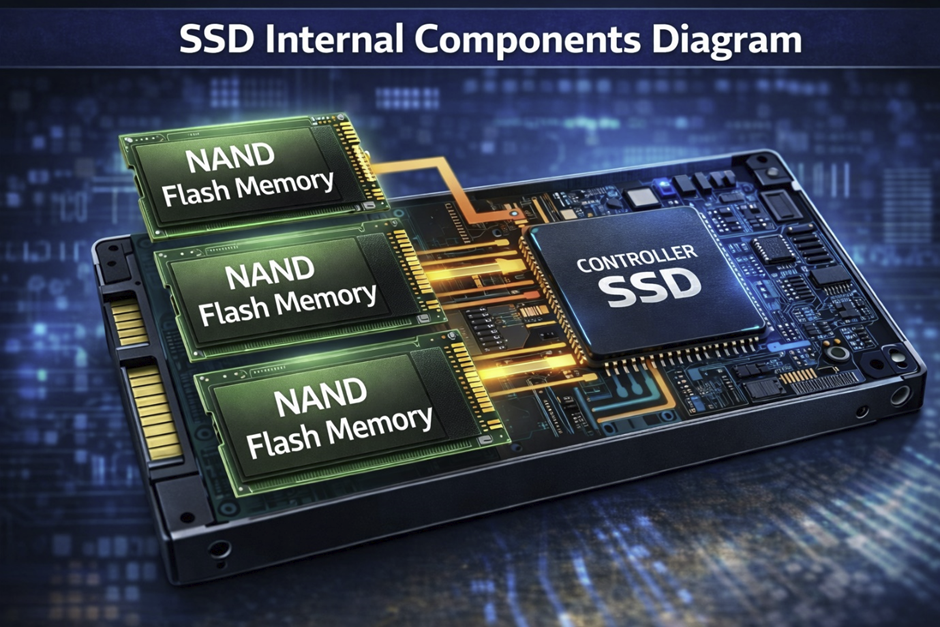
SSDs function differently from traditional storage devices by using flash memory to store data electronically rather than mechanically. This allows for faster data access and reduced latency, making SSDs ideal for modern computing needs. The architecture of an SSD includes memory cells, a controller, and firmware that manages data operations efficiently. The absence of moving parts means SSDs generate less heat and consume less power. This efficiency is particularly beneficial in laptops and mobile devices. SSDs also support advanced technologies like compression and caching to optimize performance. With increasing reliance on high-speed processing, SSDs work closely with modern processors to deliver seamless performance. Their design ensures durability and long-term reliability, even under heavy workloads.
Basic Working Principle of SSD
The core working principle of an SSD revolves around storing data in flash memory cells using electrical charges. These cells are organized into pages and blocks, allowing data to be written, read, and erased efficiently. Unlike HDDs, which rely on spinning disks, SSDs access data instantly, improving speed significantly. This design reduces latency and enhances system responsiveness. The SSD communicates with the system through interfaces like SATA or PCIe, ensuring fast data transfer. It also uses algorithms to manage wear leveling and extend lifespan. This efficient data handling is crucial in applications like web development and database management. SSDs also support error correction mechanisms to prevent data loss. Overall, their working principle is based on speed, efficiency, and reliability.
NAND Flash Memory Explained
NAND flash memory is the backbone of SSD technology, responsible for storing data in a non-volatile manner. It retains information even when power is turned off, making it ideal for long-term storage. Developed in the 1980s, NAND technology has evolved significantly over the years. Modern SSDs use advanced forms like TLC and QLC to increase storage density. Companies like Samsung and Intel have been leaders in NAND innovation. NAND memory is organized into cells that store bits of data, allowing high-speed access. This technology enables SSDs to outperform traditional drives in nearly every aspect. It also supports features like error correction and wear leveling. NAND memory plays a crucial role in ensuring SSD performance and durability.
Role of Controller in SSD
The SSD controller acts as the brain of the drive, managing all data operations and ensuring efficient performance. It handles tasks such as data reading, writing, error correction, and wear leveling. Without a controller, the SSD would not function properly. Modern controllers are highly advanced, capable of optimizing performance in real time. They also manage communication between the SSD and the system’s CPU. Companies like Intel and Samsung design specialized controllers for their drives. The controller ensures data integrity and prevents corruption. It also improves speed by managing caching and data flow. Overall, the controller is essential for SSD functionality.
Difference Between DRAM and DRAM-less SSDs
DRAM-based SSDs include a dedicated memory cache that improves performance by storing frequently accessed data. This allows faster read and write operations, making them ideal for high-performance tasks. DRAM-less SSDs, on the other hand, rely on system memory or internal algorithms to manage data. While they are more affordable, they may offer slightly lower performance. The difference becomes noticeable in tasks involving large files or heavy workloads. DRAM SSDs are commonly used in professional environments, while DRAM-less options are popular among budget users. Both types have their advantages depending on use case. Manufacturers like Kingston and Samsung offer both variants. Choosing between them depends on performance needs and budget.
Types of SSD
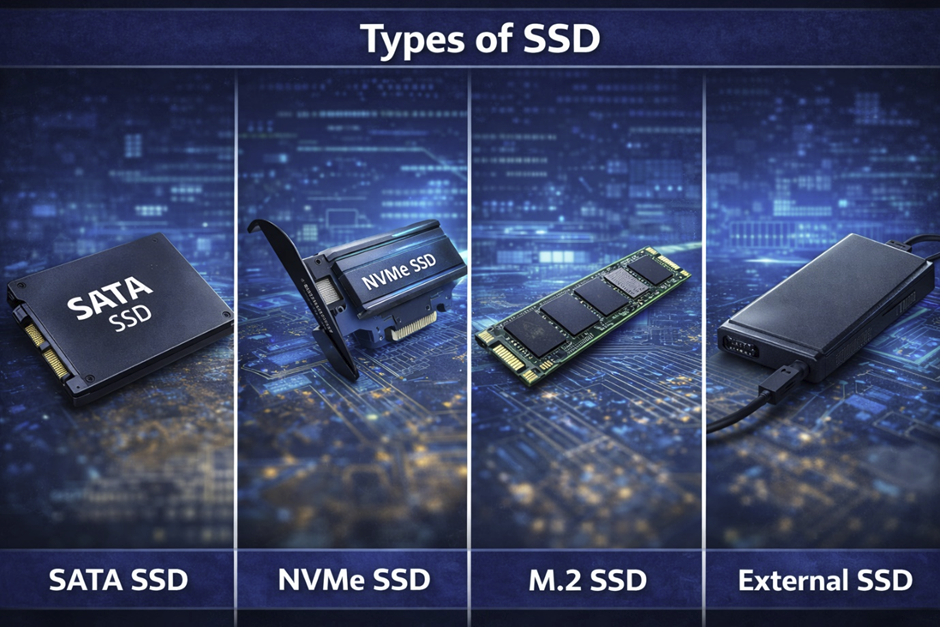
SSDs are not a single unified technology but a family of storage solutions that differ in interface, speed, and physical design. The classification of SSDs became important after 2013, when performance gaps between interfaces like SATA and PCIe started to widen significantly. Companies such as Samsung, Intel, and Western Digital began releasing specialized SSD types for different workloads. Modern operating systems including Windows, Linux, and MacOS are optimized to support multiple SSD formats seamlessly. These variations allow systems to better handle tasks like compression and high-speed data processing. SSD types also influence how efficiently systems interact with hardware like the CPU and memory. In enterprise environments, different SSD types are selected based on workload intensity and scalability. Even consumer devices now include multiple SSD slots supporting different standards. Understanding these types is essential for choosing the right balance between performance, cost, and compatibility.
SATA SSD
SATA SSDs are built on the Serial ATA interface, which was originally designed for hard drives and introduced in 2003. Despite being an older standard, SATA SSDs remain widely used due to their compatibility with legacy systems and affordability. These drives typically reach maximum speeds of around 550 MB/s, limited by the SATA interface itself rather than the flash memory. This makes them significantly faster than HDDs but slower than newer SSD technologies. SATA SSDs are ideal for general-purpose computing, including office work, browsing, and light web development. They are often used as upgrade solutions for older laptops and desktops that cannot support newer interfaces. Manufacturers like Kingston, Samsung, and Crucial continue to produce reliable SATA SSD models. These drives also improve everyday tasks such as opening files, launching applications, and handling moderate workloads. While not cutting-edge, SATA SSDs provide a stable and cost-effective storage solution for most users.
NVMe SSD
NVMe SSDs are designed to overcome the limitations of SATA by using the PCIe interface for direct communication with the system. The NVMe protocol was standardized around 2011, enabling much faster data transfer rates and lower latency. Unlike SATA drives, NVMe SSDs interact more efficiently with the CPU, reducing bottlenecks in data processing. These drives can achieve speeds exceeding 7000 MB/s, making them ideal for high-performance computing tasks. NVMe SSDs are especially beneficial for workloads involving programming, virtualization, and large-scale databases. They also improve performance when working with large files, such as video editing projects or machine learning datasets. Leading manufacturers like Samsung and Intel have pushed NVMe technology forward with continuous innovations. These drives also support parallel processing, allowing multiple data operations simultaneously. As a result, NVMe SSDs are now the preferred choice for modern high-performance systems.
M.2 SSD
M.2 SSDs refer to a compact form factor that supports both SATA and NVMe interfaces, making them highly versatile. Introduced in 2013, the M.2 standard allows SSDs to be mounted directly onto the motherboard without cables. This design improves airflow and reduces clutter inside the system. M.2 SSDs are widely used in laptops, ultrabooks, and compact desktops due to their small size. Companies like Intel and Samsung have adopted this form factor across their product lines. These drives are available in different lengths and configurations to suit various devices. M.2 SSDs also enhance system performance by reducing latency and improving data transfer speeds. They are particularly useful in gaming and high-performance environments. As modern devices continue to shrink, the M.2 form factor has become a standard in SSD design.
PCIe SSD
PCIe SSDs connect directly to the motherboard through PCIe slots, offering some of the highest data transfer speeds available. This technology gained popularity after 2015, especially in enterprise and high-performance computing systems. PCIe SSDs bypass traditional storage bottlenecks by communicating directly with system components. This allows them to handle demanding workloads such as Artificial Intelligence processing and real-time analytics. These drives are commonly used in servers and workstations where performance is critical. Companies like Intel and AMD have optimized their platforms to support PCIe SSDs efficiently. PCIe SSDs also enable parallel data processing, improving multitasking capabilities. Their speed and reliability make them ideal for professional applications. As technology advances, PCIe SSDs continue to push the boundaries of storage performance.
External SSD
External SSDs are portable storage devices that provide high-speed data transfer and flexibility across multiple systems. These drives typically connect via USB, making them compatible with a wide range of devices. Their popularity increased after 2018, as users needed faster solutions for transferring and backing up data. External SSDs are particularly useful for handling large files, such as videos, backups, and project data. Brands like Samsung and SanDisk offer durable and high-performance external SSD options. Many external SSDs include built-in encryption and password protection for data security. They are widely used by professionals in photography, video editing, and IT. Their compact size makes them easy to carry while maintaining high performance. External SSDs combine portability with speed, making them an essential tool for modern users.
SSD vs HDD
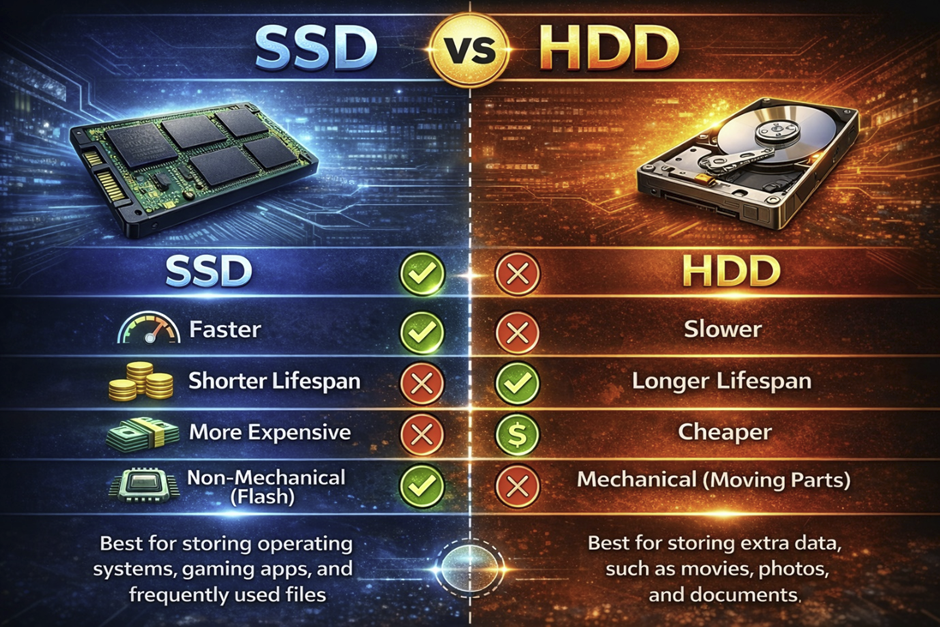
The comparison between SSDs and HDDs represents one of the most important technological transitions in computing history. Hard Disk Drives were first introduced by IBM in 1956, using magnetic platters and mechanical arms to store and retrieve data. In contrast, SSDs rely on flash memory technology, which eliminates moving parts and significantly improves speed and reliability. This shift became especially noticeable after 2010, when companies like Samsung and Intel began mass adoption of SSD technology in consumer devices. Modern operating systems such as Windows, Linux, and MacOS are optimized to take full advantage of SSD performance improvements. The difference between these two storage types affects everything from system boot speed to application responsiveness and even energy consumption. SSDs also improve workflows involving compression and handling of complex data operations. Meanwhile, HDDs still remain relevant for archival storage due to their lower cost per gigabyte. Understanding these differences helps users make informed decisions based on performance needs and budget constraints.
Speed Comparison
Speed is the most significant factor distinguishing SSDs from HDDs, and it directly impacts the overall computing experience. SSDs provide near-instant data access because they use electronic memory instead of mechanical movement. In contrast, HDDs rely on spinning disks and read/write heads, which introduce latency and delays. This results in SSDs being up to ten times faster in real-world scenarios, particularly when loading operating systems or launching applications. Tasks such as opening a large PDF or working within development environments become significantly smoother on SSDs. The responsiveness of input devices like a keyboard and mouse is also improved because the system processes commands faster. SSDs are particularly beneficial for multitasking, as they handle multiple read/write operations simultaneously without performance drops. In comparison, HDDs struggle with fragmented data and slower access times. This speed advantage makes SSDs essential for modern computing tasks and high-performance workflows.
Durability and Reliability
Durability is a major advantage of SSDs due to their solid-state design, which eliminates mechanical components. HDDs contain spinning platters and moving arms, making them vulnerable to physical damage from drops or vibrations. SSDs, on the other hand, can withstand shocks and harsh conditions, making them ideal for portable devices like laptops. This reliability is especially important in environments involving system administration, where data integrity and uptime are critical. SSDs also experience less wear from regular use because they do not rely on mechanical movement. Although SSDs have limited write cycles, modern wear-leveling algorithms significantly extend their lifespan. Companies like HP and Dell increasingly favor SSDs in their devices for improved reliability. Additionally, SSDs maintain consistent performance over time, whereas HDDs may degrade due to mechanical wear. Overall, SSDs provide a more stable and durable storage solution for both personal and professional use.
Power Consumption
Power efficiency is another key area where SSDs outperform HDDs, particularly in modern computing environments. SSDs consume significantly less energy because they do not require motors to spin disks or move mechanical components. This reduced power usage translates into longer battery life for laptops and mobile devices running systems like Android and MacOS. Lower energy consumption also results in less heat generation, which helps maintain system stability and prolong hardware lifespan. In large-scale data centers operated by companies such as Google and Oracle, SSDs contribute to significant reductions in electricity costs. This efficiency is especially important in cloud computing environments where thousands of storage devices operate simultaneously. Additionally, reduced heat output minimizes the need for advanced cooling systems, further improving energy savings. SSDs also support faster power state transitions, improving overall system responsiveness. These benefits make SSDs the preferred choice for energy-conscious users and organizations.
Noise Levels
Noise generation is a clear distinction between SSDs and HDDs, directly affecting user comfort and system experience. HDDs produce audible noise due to the spinning of platters and movement of read/write heads, especially during intensive operations. This noise can become noticeable in quiet environments, such as offices or home workspaces. SSDs, however, operate completely silently because they have no moving parts. This silent operation enhances the overall user interface experience, making systems feel smoother and more refined. It is particularly beneficial for professionals working in audio production or environments requiring minimal noise disruption. Additionally, silent operation contributes to a perception of higher-quality hardware design. As modern computing shifts toward minimalism and efficiency, silent performance becomes an expected standard. SSDs fully meet this expectation, making them superior in noise-sensitive scenarios.
Price Comparison
Price remains one of the few areas where HDDs still have an advantage over SSDs, particularly in terms of cost per gigabyte. HDDs are significantly cheaper, making them suitable for storing large amounts of data such as backups and archives. However, SSD prices have dropped dramatically since 2015, largely due to advancements in NAND flash technology by companies like Samsung and Intel. While SSDs are still more expensive, their performance benefits often justify the cost for many users. The gap continues to shrink as manufacturing processes improve and demand increases. SSDs also provide better long-term value due to lower maintenance needs and higher reliability. For tasks involving large files, SSDs reduce transfer times, saving both time and operational costs. Many users now adopt hybrid storage solutions, combining SSDs for speed and HDDs for capacity. Overall, the price-performance balance increasingly favors SSDs in modern systems.
Which One Should You Choose?
Choosing between an SSD and an HDD depends on your specific needs, workload, and budget considerations. If speed, responsiveness, and system performance are priorities, SSDs are the clear choice. They are ideal for tasks such as web development, gaming, and running modern applications that require fast data access. HDDs, however, remain useful for storing large volumes of data at a lower cost, particularly for backups and archival purposes. Many users combine both technologies, using SSDs for operating systems and frequently used applications, while relying on HDDs for storage. This hybrid approach provides a balance between performance and affordability. For professionals working with data-intensive tasks or Artificial Intelligence, SSDs are essential. Additionally, SSDs improve overall system responsiveness, making everyday tasks more efficient. As technology continues to evolve, SSDs are becoming the standard storage solution for most users.
Advantages of SSD
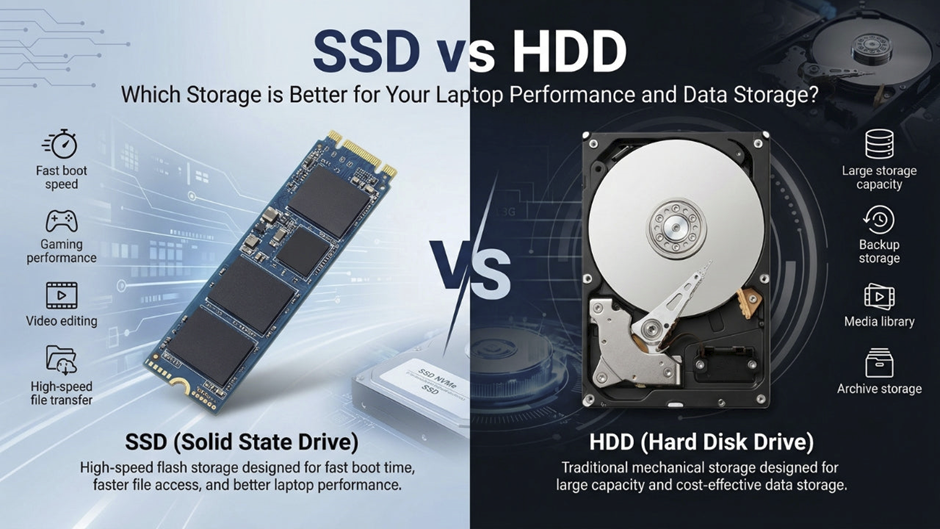
Solid-State Drives provide a wide range of advantages that have fundamentally reshaped modern computing performance and expectations. Their adoption accelerated after 2012, when manufacturers like Samsung and Intel began improving NAND technology and reducing costs. Unlike mechanical drives, SSDs rely entirely on flash memory, allowing faster and more reliable data access. This shift has improved how operating systems like Windows, Linux, and MacOS function in real-world scenarios. SSDs also enhance workloads involving Artificial Intelligence, virtualization, and advanced programming environments. Their performance directly affects how smoothly users interact with applications and system processes. Additionally, SSDs contribute to better thermal management, which is crucial for compact and high-performance devices. The advantages extend beyond speed, influencing energy efficiency, durability, and overall user satisfaction. As a result, SSDs are now considered a standard component in both consumer and enterprise computing systems.
Faster Boot Time
One of the most noticeable advantages of SSDs is their ability to drastically reduce system boot time compared to traditional storage devices. Systems equipped with SSDs can boot in under 10 seconds, whereas HDD-based systems may take several minutes, especially on older hardware from before 2010. This speed improvement is due to the elimination of mechanical delays and instant access to stored data. Operating systems such as Windows and MacOS are optimized to take advantage of SSD performance, allowing faster initialization of services and startup programs. This improvement is particularly valuable in professional environments where time efficiency is critical. SSDs also enhance resume-from-sleep and hibernation processes, making systems feel instantly responsive. Even simple actions like entering a password and loading a user session occur much faster. Faster boot times also reduce system downtime during updates and restarts. Overall, SSDs significantly improve productivity by minimizing waiting time.
Improved Application Performance
SSDs greatly enhance application performance by reducing load times and improving data access speeds across software environments. Applications that rely heavily on storage, such as development tools and databases, benefit the most from SSD technology. For example, environments used in Python development or large-scale web development projects load files and dependencies much faster. This leads to smoother workflows and increased efficiency for developers and professionals. SSDs also reduce bottlenecks between storage and the CPU, allowing faster data processing. Tasks involving large files, such as video editing or data analysis, become significantly more efficient. Even everyday applications like browsers and office tools respond faster and run more smoothly. SSDs also improve multitasking by handling multiple read/write operations simultaneously without performance degradation. This makes them essential for modern computing environments where speed and responsiveness are critical.
Energy Efficiency
Energy efficiency is another major advantage of SSDs, especially in portable and large-scale computing environments. SSDs consume less power than HDDs because they do not require motors or mechanical components to operate. This reduced power consumption leads to longer battery life in laptops and mobile devices running systems like Android and MacOS. Lower energy usage also results in less heat generation, which helps maintain system stability and extends hardware lifespan. In enterprise environments, companies such as Google and Oracle use SSDs to reduce energy costs in data centers. This efficiency becomes even more important in cloud infrastructure, where thousands of drives operate simultaneously. SSDs also support faster power state transitions, improving system responsiveness. Reduced heat output minimizes the need for advanced cooling systems. Overall, SSDs provide both environmental and economic benefits through improved energy efficiency.
Silent Operation
Silent operation is a defining advantage of SSDs, making them ideal for modern computing environments that prioritize comfort and minimal noise. Unlike HDDs, which generate sound from spinning platters and moving parts, SSDs operate completely silently. This absence of noise enhances the overall user interface experience, making systems feel smoother and more refined. Silent operation is particularly beneficial in workplaces, libraries, and recording studios where noise can be disruptive. It also contributes to better concentration and productivity for users. Additionally, silent systems are often perceived as more advanced and higher quality. SSDs align with modern design trends that emphasize minimalism and efficiency. The lack of mechanical movement also reduces vibration, further improving system stability. Overall, SSDs provide a quieter and more comfortable computing experience.
Lightweight and Compact Design
SSDs are significantly smaller and lighter than traditional HDDs, enabling the development of modern compact computing devices. This design advantage became prominent after 2015, when ultrabooks and thin laptops gained popularity. Manufacturers like HP and Dell adopted SSDs to create slimmer and more portable devices. The compact size of SSDs allows for better internal space management, improving airflow and cooling efficiency. Form factors such as M.2 further reduce size while maintaining high performance. This makes SSDs ideal for devices with limited physical space, including tablets and embedded systems. Additionally, the lightweight design contributes to improved portability for mobile users. SSDs also enable innovative hardware designs that were not possible with bulky HDDs. Their compact nature supports modern computing trends focused on mobility and efficiency.
Disadvantages of SSD
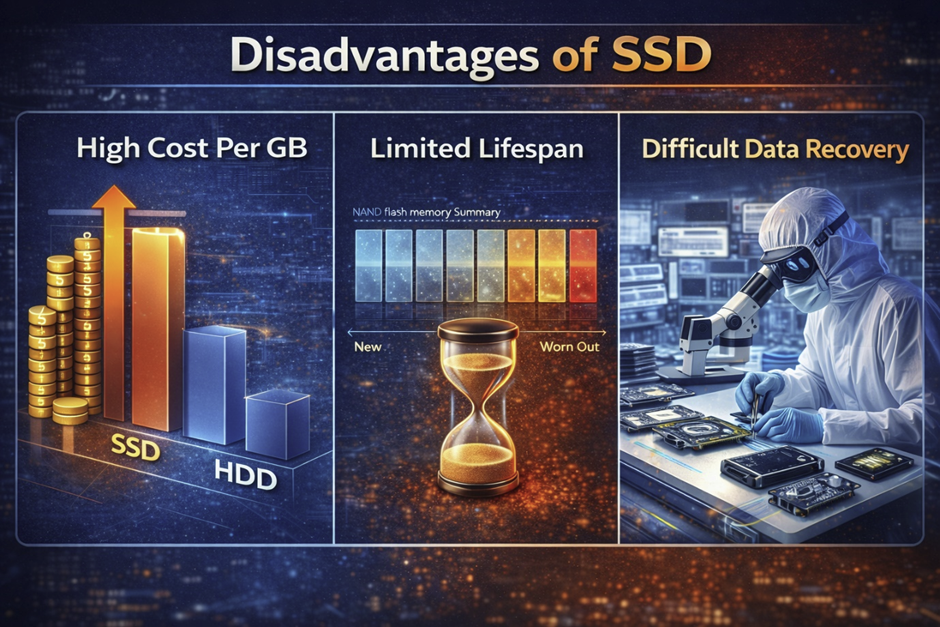
Despite their many advantages, SSDs also come with several limitations that users should carefully consider before making a purchase decision. While SSD technology has improved significantly since 2010, certain constraints still exist due to the nature of flash memory. Companies like Samsung and Intel continue to innovate, but trade-offs between cost, durability, and capacity remain relevant. These disadvantages are especially noticeable in budget systems or large-scale storage environments. SSD limitations can affect workflows involving large files, backups, and long-term data storage. In enterprise environments, organizations often combine SSDs with traditional drives to balance performance and cost. Additionally, understanding these drawbacks helps users make better decisions when upgrading or building systems. SSD technology is evolving rapidly, but it is not without compromises. Evaluating both strengths and weaknesses ensures a more informed and practical approach to storage selection.
Higher Cost per GB
One of the most significant disadvantages of SSDs is their higher cost per gigabyte compared to traditional HDDs. Although prices have decreased since 2015, SSDs are still more expensive when considering large storage capacities. This cost difference becomes especially noticeable when users need several terabytes of storage for backups or media libraries. HDDs remain the more economical choice for storing massive amounts of data at a lower price. However, SSD pricing is influenced by NAND flash production costs and technological advancements. Companies like Samsung and Micron have worked to reduce these costs, but SSDs still require more complex manufacturing processes. For users working with large files, such as video editing or data archiving, the cost can quickly increase. This often leads to hybrid storage setups combining SSDs and HDDs. While SSDs offer better performance, their higher price can be a limiting factor for budget-conscious users. As technology advances, this gap continues to narrow but has not yet disappeared.
Limited Write Cycles
SSDs have a finite number of write cycles, which means each memory cell can only be written to a limited number of times before it begins to degrade. This limitation is inherent to NAND flash technology and has been a concern since its early development in the 1980s. Modern SSDs mitigate this issue through advanced wear-leveling algorithms that distribute writes evenly across memory cells. These technologies significantly extend the lifespan of SSDs under normal usage conditions. However, in environments involving constant data writing, such as logging systems or intensive programming tasks, wear can accumulate faster. Manufacturers like Intel and Samsung provide endurance ratings such as TBW (terabytes written) to indicate expected lifespan. Despite these improvements, SSDs are still not ideal for workloads that require continuous heavy writing. Proper usage and system optimization can help extend their durability. Overall, while limited write cycles are a concern, they are less impactful for average users.
Data Recovery Challenges
Data recovery from SSDs is more complex compared to traditional HDDs due to their internal architecture and data management processes. HDDs store data in a linear and predictable manner, making recovery easier in many cases. SSDs, however, use techniques like wear leveling and compression, which distribute data across multiple memory cells. This makes locating and reconstructing lost data significantly more difficult. Additionally, features like TRIM automatically erase unused data blocks, reducing the chances of recovery after deletion. Professional data recovery services can still retrieve data, but the process is often more expensive and less successful. This is particularly critical for users who do not maintain regular backups. SSD failures can sometimes occur without warning, leaving little opportunity for recovery. For sensitive data, relying solely on SSD storage without backup solutions can be risky. Therefore, implementing backup strategies is essential when using SSDs.
Storage Capacity Limitations
Although SSD capacities have increased over time, they still lag behind HDDs in terms of maximum affordable storage size. High-capacity SSDs are available, but they come at a significantly higher cost, making them less accessible for average users. This limitation is especially relevant for applications requiring massive storage, such as media archives and enterprise databases. HDDs remain the preferred option for bulk storage due to their cost efficiency. SSD capacity constraints can also impact workflows involving backups and long-term data retention. In systems where storage expansion is limited, users must carefully manage available space. Technologies like cloud storage are often used alongside SSDs to overcome these limitations. Companies like Google and Microsoft provide cloud-based solutions that complement local SSD storage. While SSD capacity continues to grow, affordability remains a key challenge. As a result, users often balance SSD performance with HDD capacity in hybrid setups.