What is USB and USB Flash Drive? Complete Guide to Universal Serial Bus Technology. Part 1
Introduction to USB Technology
USB (Universal Serial Bus) is one of the most important technologies in modern computing, enabling seamless communication between devices and computers. First introduced in 1996, USB replaced a wide range of older connection standards and simplified how hardware interacts with systems. Before USB, users relied on complex setups involving multiple ports, drivers, and manual configurations, especially when connecting devices like a keyboard, mouse, or printers. The introduction of USB made it possible to connect devices instantly without rebooting, revolutionizing the user interface experience. Companies such as Microsoft, IBM, and Intel played key roles in developing and promoting this standard. Today, USB is used across nearly all platforms including Windows, Linux, and MacOS. Its versatility extends beyond simple data transfer to powering devices and supporting advanced technologies like Artificial Intelligence hardware accelerators.
What Does USB Stand For (Universal Serial Bus)
USB stands for Universal Serial Bus, a standardized interface designed to connect computers with peripheral devices. The term “universal" reflects its broad compatibility across different hardware manufacturers and operating systems such as Windows, Linux, and MacOS. Introduced in 1996 by a consortium including Intel and Microsoft, USB aimed to unify previously fragmented connection systems. The “serial" aspect refers to how data is transmitted one bit at a time, improving efficiency compared to older parallel systems. USB supports both data transfer and power delivery, making it highly versatile. It enables users to easily transfer files, including PDF documents or even large files, without needing complex configurations. Over time, USB has evolved into a core component of modern programming environments and hardware ecosystems. Its plug-and-play nature eliminates the need for manual driver installation in most cases.
Why USB Became the Standard Connection Interface
USB became the global standard because it simplified device connectivity in a way no previous technology could. Before USB, connecting devices required different ports and often manual setup processes, which complicated system administration tasks. USB introduced plug-and-play functionality, allowing devices to be recognized instantly by operating systems like Windows and Linux. This drastically improved productivity for both everyday users and developers working in Python or web development. Another key advantage was its ability to support multiple devices through hubs, reducing the need for multiple ports. Major companies such as HP, Sony, and Samsung adopted USB early, accelerating its global acceptance. USB also improved data transfer reliability, reducing errors compared to older standards. Its ability to deliver power alongside data further increased its importance. Over time, USB became essential for everything from charging smartphones to transferring data securely.
Brief History of USB Development
The development of USB began in the mid-1990s as a collaborative effort to simplify computer connectivity. In 1996, USB 1.0 was introduced, but it was not widely adopted until USB 1.1 improved compatibility. Companies like IBM, Intel, and Microsoft were instrumental in pushing the technology forward. Early adoption was slow because many devices still relied on legacy ports. However, the release of Windows 98 significantly boosted USB usage by providing native support. By the early 2000s, USB had replaced older storage methods like floppy disks, marking a major shift in data storage. The introduction of USB flash drives allowed users to easily carry and transfer data without bulky hardware. Over time, USB evolved to support faster speeds and more complex devices. Today, it is a foundational technology in both consumer and enterprise environments.
Evolution from Serial and Parallel Ports to USB
Before USB, computers relied on serial and parallel ports to connect external devices. Serial ports transmitted data bit by bit, while parallel ports sent multiple bits simultaneously, but both had limitations. These older interfaces were slow, bulky, and difficult to configure, especially when dealing with multiple devices. Users often faced compatibility issues and needed technical knowledge to manage connections. USB simplified this by providing a single standardized interface. It eliminated the need for multiple connectors and reduced hardware complexity. This transition significantly improved usability and reduced setup time. It also enhanced the overall GUI experience by enabling faster interaction between devices and systems. As USB adoption grew, manufacturers gradually phased out legacy ports. This shift marked a major milestone in the evolution of computer hardware.
Importance of USB in Modern Computing
USB plays a critical role in modern computing by enabling seamless connectivity between devices. It supports a wide range of applications, from data transfer to powering devices. USB is essential for tasks such as transferring a screenshot, backing up data, or installing operating systems. It is also widely used in enterprise environments for system administration and troubleshooting. USB drives are commonly used to upload files or transport sensitive data securely. However, they can also pose risks if infected with a virus or trojan, making antivirus protection important. Modern USB standards support high-speed data transfer, enabling efficient handling of large datasets. USB is also integrated into emerging technologies, including Artificial Intelligence systems. Its versatility ensures it remains a cornerstone of digital infrastructure.
History and Evolution of USB
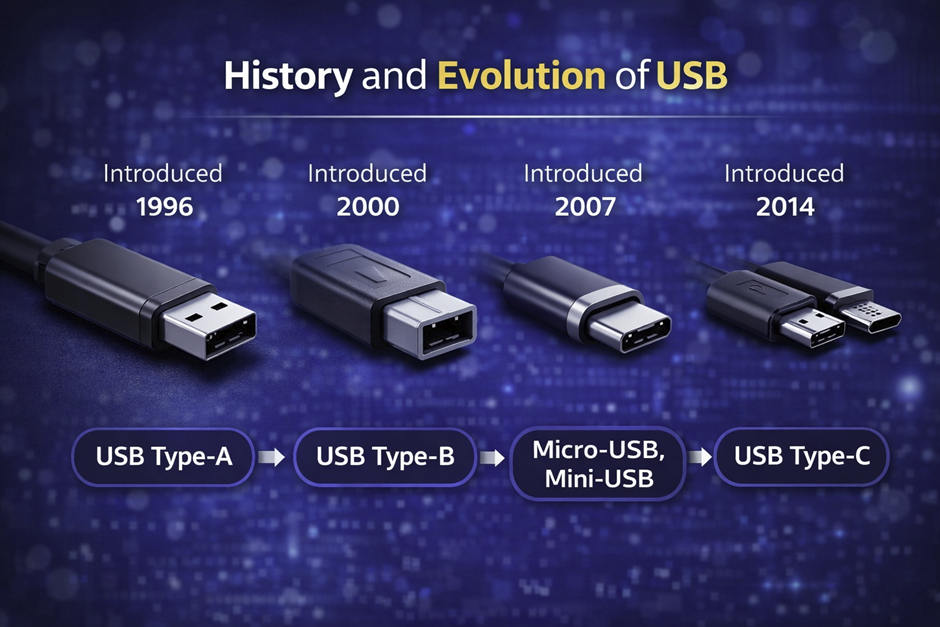
The evolution of USB technology reflects the rapid advancement of computing needs over the past decades. Starting from modest beginnings in 1996, USB has continuously improved in speed, efficiency, and functionality. Each new version introduced significant enhancements, allowing users to transfer increasingly large files and power more demanding devices. Early versions focused on replacing outdated interfaces, while modern versions aim to support high-performance computing and advanced applications. Companies like Intel, Microsoft, and HP have played crucial roles in its development. The transition from USB 1.0 to USB4 demonstrates how technology adapts to user demands. Today, USB is not only a data transfer tool but also a power delivery system. Its evolution mirrors the growth of digital ecosystems worldwide.
USB 1.0 and USB 1.1 – The Beginning
USB 1.0, introduced in 1996, marked the beginning of a new era in device connectivity. However, it had limitations in speed and compatibility, which led to the release of USB 1.1 in 1998. These early versions supported basic peripherals like a keyboard and mouse, but were not suitable for high-speed data transfer. Adoption increased significantly after Microsoft included USB support in Windows 98. This made it easier for users to connect devices without additional drivers. Despite its limitations, USB 1.x laid the foundation for future improvements. It introduced the concept of plug-and-play, which became a defining feature of USB. Early USB devices were relatively simple and focused on basic functionality. These versions played a crucial role in replacing older connection standards.
USB 2.0 – High-Speed Revolution
USB 2.0, released in 2000, brought a major leap in data transfer speeds, reaching up to 480 Mbps. This made it possible to transfer large files such as videos and software packages efficiently. USB flash drives became widely popular during this period, replacing older storage media like CDs and floppy disks. Companies like Sony and Samsung began producing high-capacity USB drives, making portable storage more accessible. USB 2.0 also improved compatibility and reliability across devices. It became the standard for many years due to its balance of speed and affordability. This version supported a wide range of devices, including printers and external storage. Its widespread adoption helped solidify USB as the dominant interface.
USB 3.0, 3.1, and 3.2 – SuperSpeed Era
The introduction of USB 3.0 in 2008 marked the beginning of the SuperSpeed era, with transfer rates up to 5 Gbps. Later versions, USB 3.1 and 3.2, further increased speeds and improved efficiency. These advancements made USB suitable for high-performance tasks such as video editing and web development. The new standards also improved power delivery capabilities, enabling faster charging of devices. USB 3.x introduced better data encoding techniques, enhancing reliability. It became essential for professionals working with large datasets and high-resolution media. Many modern devices, including laptops and smartphones, adopted these standards. The blue-colored ports became a recognizable feature of USB 3.0 devices.
USB4 and Future of USB Technology
USB4, introduced in 2019, represents the latest advancement in USB technology. It offers speeds up to 40 Gbps and integrates with Thunderbolt technology. This allows for high-performance applications such as 4K video streaming and advanced programming tasks. USB4 also improves compatibility with previous versions, ensuring a smooth transition. It supports multiple data and display protocols, making it highly versatile. Companies like Intel have been key contributors to its development. USB4 is designed to meet the demands of modern computing, including Artificial Intelligence workloads. Its adoption is expected to grow rapidly in the coming years. This version sets the stage for future innovations in connectivity.
Key Milestones in USB Development Timeline
The timeline of USB development includes several important milestones that shaped modern computing. From its introduction in 1996 to the release of USB4 in 2019, each version brought significant improvements. The adoption of USB 2.0 in the early 2000s marked a turning point in data transfer technology. The introduction of USB 3.0 in 2008 further accelerated performance capabilities. USB-C, introduced later, revolutionized connector design with its reversible interface. Major companies like IBM, Microsoft, and Intel played key roles in these advancements. Each milestone reflects the growing demand for faster and more efficient connectivity. USB continues to evolve, adapting to new technological challenges. Its development timeline highlights its importance in the digital age.
How USB Works (Technical Overview)
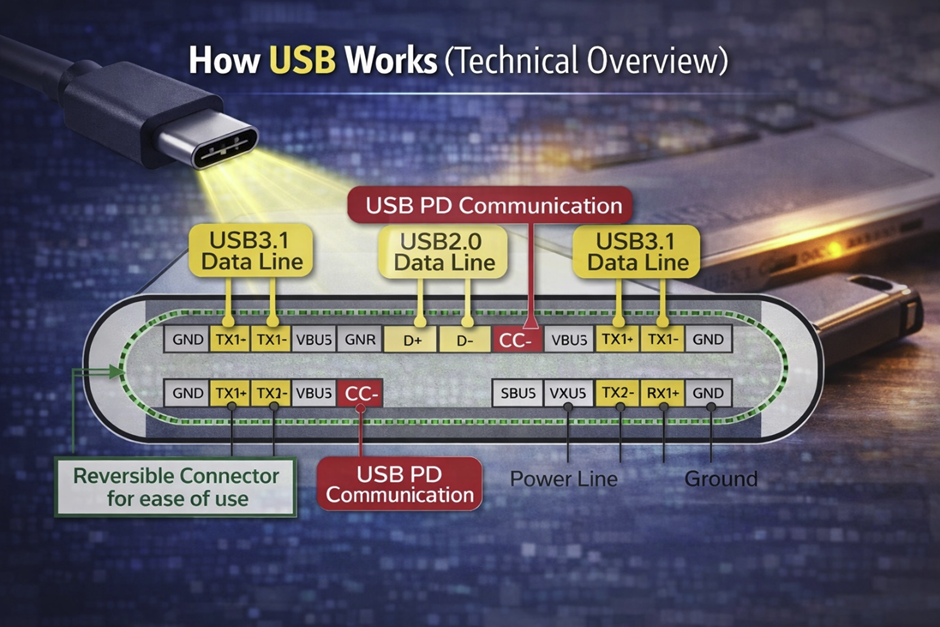
USB operates through a structured communication system between a host and connected devices. The host, typically a computer powered by a CPU, controls the communication and manages data flow. USB uses a tiered star topology, allowing multiple devices to connect through hubs. Data is transmitted in packets, ensuring efficient and reliable communication. USB also supports power delivery, enabling devices to function without separate power sources. This dual capability makes USB highly efficient and widely used. Modern systems running Windows, Linux, or MacOS rely heavily on USB for peripheral connectivity. Its architecture is designed to be scalable and adaptable to new technologies.
Basic Working Principle of USB
The basic working principle of USB involves communication between a host and peripheral devices. The host initiates all data transfers, ensuring controlled communication. Data is transmitted in packets, which improves efficiency and reduces errors. USB devices are identified through unique addresses assigned during connection. This process allows multiple devices to operate simultaneously without conflict. The system is designed to be user-friendly, requiring minimal configuration. USB also supports error detection mechanisms to ensure data integrity. This makes it reliable for transferring important files, including PDF documents. Its simplicity and efficiency are key reasons for its widespread adoption.
Host and Device Communication Explained
In USB architecture, the host plays a central role in managing communication. Devices cannot initiate communication; they respond to host requests. This ensures organized data flow and prevents conflicts. The host assigns addresses to devices, allowing it to manage multiple connections efficiently. This structure is particularly useful in environments involving system administration. USB hubs expand connectivity by allowing multiple devices to connect to a single port. Communication is handled through defined protocols, ensuring consistency. This system is scalable and supports a wide range of devices. It is a key feature that makes USB versatile and reliable.
Data Transfer Methods and Protocols
USB supports several data transfer methods, including control, bulk, interrupt, and isochronous transfers. Each method is designed for specific types of data. For example, bulk transfers are used for large data transfers, while interrupt transfers are used for devices like a mouse. These protocols ensure efficient and reliable communication. USB also supports compression techniques to optimize data transfer. This is especially useful when dealing with large datasets. Advanced protocols improve speed and reduce latency. These features make USB suitable for a wide range of applications. Its flexibility is one of its greatest strengths.
Power Delivery Through USB Ports
USB is not only a data transfer interface but also a power delivery system. It can supply power to devices such as smartphones and external drives. Modern USB standards support fast charging technologies. This eliminates the need for separate power adapters. USB-C, in particular, supports high power output, enabling laptop charging. This feature is widely used in modern devices from brands like Samsung and Motorola. Power delivery is managed through standardized protocols. This ensures safe and efficient charging. USB’s ability to combine power and data makes it highly convenient.
Plug and Play Functionality Explained
Plug-and-play functionality is one of USB’s most important features. It allows devices to be recognized and used immediately after connection. This eliminates the need for manual driver installation in most cases. Operating systems like Windows and Linux handle device configuration automatically. This improves user experience and reduces setup time. Plug-and-play is especially useful for non-technical users. It also simplifies troubleshooting and maintenance. This feature has become a standard expectation in modern computing. USB’s ease of use is a major factor in its success.
Types of USB Connectors and Ports
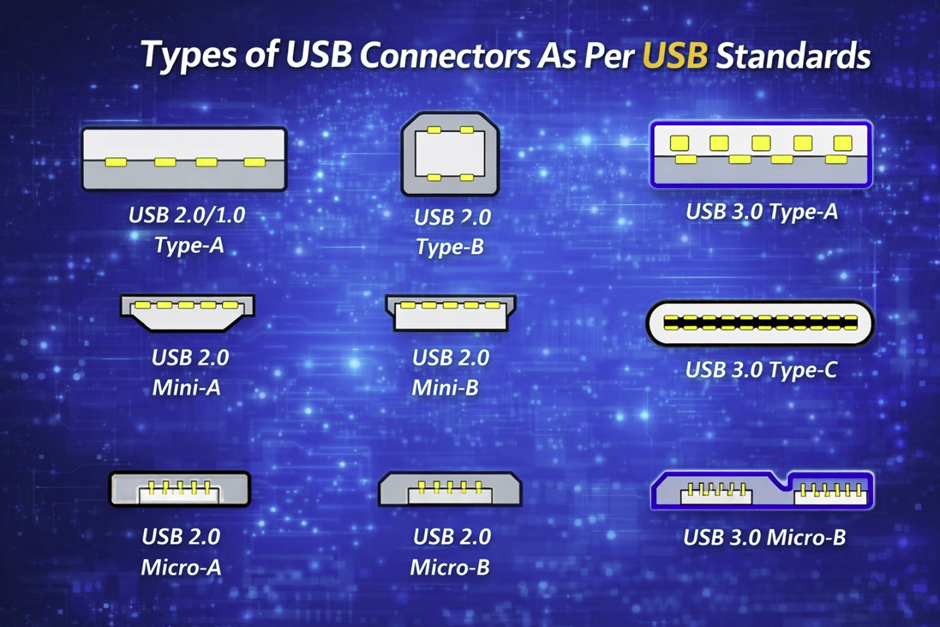
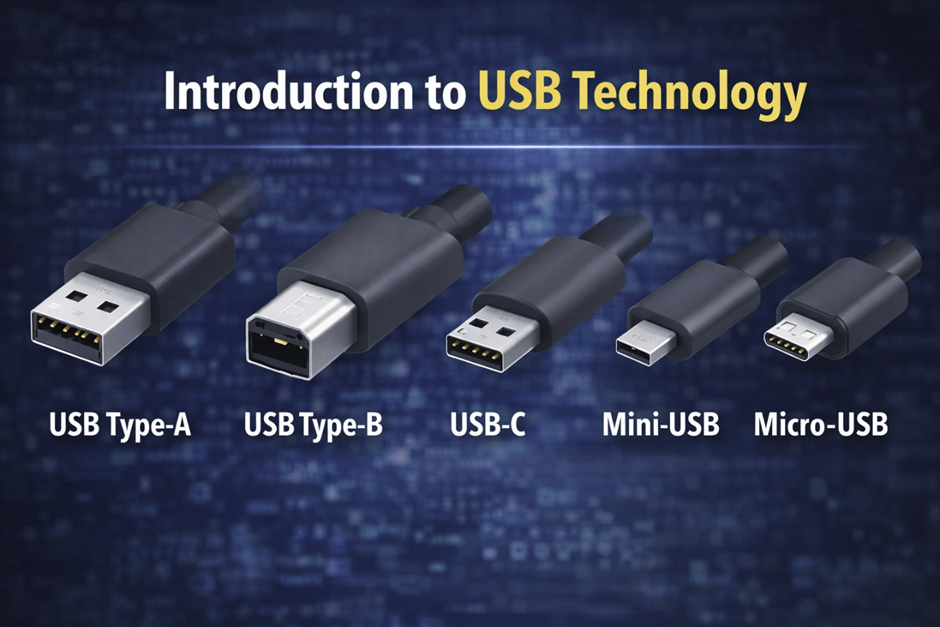
USB connectors have evolved significantly to meet the needs of different devices and applications. Each type of connector is designed for specific use cases, ranging from simple peripherals to high-performance devices. The diversity of connectors ensures compatibility across a wide range of hardware. Early connectors were larger and less flexible, while modern designs focus on compactness and efficiency. USB connectors are used in devices from major brands like Sony, Samsung, and HP. The introduction of USB-C marked a major shift toward a universal connector. This evolution reflects the growing demand for versatility and performance. Understanding these connectors is essential for choosing the right USB device.
USB Type-A (Standard USB Port)
USB Type-A is the most recognizable and widely used USB connector. It has a rectangular shape and is commonly found on computers and chargers. Introduced in the late 1990s, it became the standard for connecting devices. Type-A ports are used for a variety of peripherals, including flash drives and external storage. They are compatible with multiple USB versions, ensuring backward compatibility. Despite newer connectors, Type-A remains widely used. Its durability and simplicity make it reliable. It is a key component of USB technology.
USB Type-B (Printer and Larger Devices)
USB Type-B connectors are typically used for larger devices such as printers and scanners. They have a square shape with beveled edges. This design prevents incorrect insertion and ensures secure connections. Type-B connectors are commonly found in office environments. They are used in devices requiring stable and reliable connections. Although less common today, they are still used in specific applications. Their design reflects the needs of larger hardware. They remain an important part of USB history.
Mini-USB and Micro-USB
Mini-USB and Micro-USB connectors were developed for smaller devices like cameras and smartphones. They are more compact than Type-A and Type-B connectors. Micro-USB became widely used in mobile devices before the rise of USB-C. These connectors supported data transfer and charging. However, they had limitations in durability and speed. Over time, they were replaced by more advanced connectors. Despite this, they played a crucial role in mobile technology. Their development reflects the shift toward portable devices.
USB Type-C (Modern Standard)
USB Type-C is the latest and most advanced USB connector. It features a reversible design, making it easy to use. Introduced in 2014, it supports high-speed data transfer and power delivery. USB-C is used in modern devices, including laptops and smartphones. It is compatible with advanced technologies like USB4. Companies like Google and Apple have widely adopted it. Its versatility makes it the future of USB connectivity. USB-C continues to gain popularity across industries.
Differences Between USB Connector Types
Different USB connectors vary in size, speed, and functionality. Type-A is large and widely used, while Type-C is compact and versatile. Mini and Micro connectors were designed for portability. Each type serves a specific purpose based on device requirements. Understanding these differences helps users choose the right connector. Modern systems increasingly favor USB-C due to its advanced features. However, older connectors are still in use. This diversity ensures compatibility across devices.
USB Versions and Speed Comparison
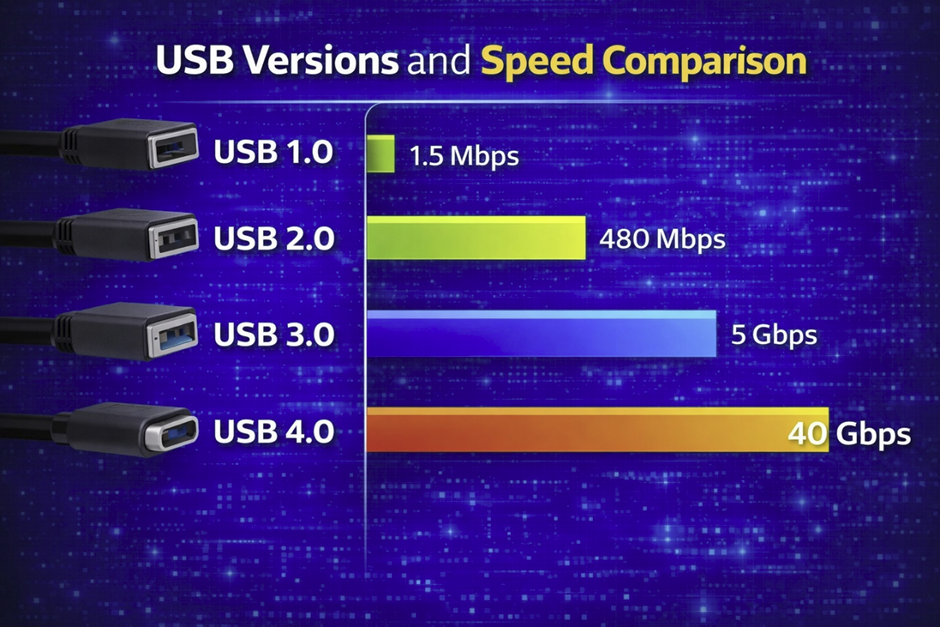
USB versions have evolved significantly since their introduction in 1996, each bringing major improvements in speed, efficiency, and functionality. Early versions were designed for simple peripherals, while modern versions support high-performance tasks such as transferring large files and running external devices. Companies like Intel and Microsoft played a critical role in defining these standards. USB speeds are measured in Mbps or Gbps, and each generation drastically increased bandwidth. These improvements have enabled faster workflows in programming, web development, and multimedia processing. Modern systems powered by advanced processors and optimized ram can fully utilize these speeds. Understanding USB versions helps users select the right device for their needs. It also ensures compatibility with existing hardware and operating systems like Windows and Linux.
Data Transfer Speeds of Each USB Version
Each USB version introduced a new level of performance, starting with USB 1.0 at 1.5 Mbps and USB 1.1 at 12 Mbps in 1998. USB 2.0, released in 2000, increased speeds to 480 Mbps, making it suitable for transferring PDF files and media. USB 3.0, introduced in 2008, boosted speeds to 5 Gbps, followed by USB 3.1 at 10 Gbps and USB 3.2 at 20 Gbps. The latest USB4, released in 2019, can reach up to 40 Gbps, rivaling high-end storage interfaces. These speeds allow efficient handling of high-resolution videos and large datasets. Companies like Samsung and Sony produce flash drives that take advantage of these capabilities. However, actual performance depends on hardware and system limitations. Faster USB versions are essential for modern computing tasks. They significantly reduce transfer time and improve productivity.
Backward Compatibility Explained
One of the most important features of USB technology is backward compatibility. This means newer USB versions can work with older devices without requiring special adapters. For example, a USB 3.0 device can still function when connected to a USB 2.0 port, though at reduced speed. This compatibility ensures long-term usability and protects user investments. Operating systems like Windows, Linux, and MacOS are designed to support multiple USB generations seamlessly. This feature simplifies upgrades and reduces compatibility issues. It is especially useful in enterprise environments involving system administration. However, users must understand that performance will always match the lowest supported version. Backward compatibility is a key reason for USB’s widespread adoption. It ensures flexibility across different devices and generations.
Real-World Speed vs Theoretical Speed
While USB specifications list theoretical maximum speeds, real-world performance is often lower. Factors such as hardware limitations, file size, and system configuration affect actual transfer rates. For example, transferring many small files may be slower than transferring a single large file due to overhead. Storage device quality and CPU performance also play a role. Even operating system efficiency in platforms like Windows or Linux can impact speed. Background processes, including antivirus scans, may further reduce performance. Additionally, cable quality and port type can influence results. Users often notice that real speeds are significantly lower than advertised values. Understanding this difference helps set realistic expectations. It also highlights the importance of choosing high-quality hardware.
Choosing the Right USB Version for Your Needs
Selecting the right USB version depends on your specific requirements. For basic tasks like connecting a keyboard or mouse, USB 2.0 is usually sufficient. However, for transferring large files or running external drives, USB 3.x or USB4 is recommended. Professionals working in programming or multimedia editing benefit from higher speeds. Modern devices from brands like HP, Samsung, and Sony often support the latest standards. Compatibility with your system is also important, especially when using older hardware. Budget considerations may influence your choice, as newer versions are typically more expensive. Future-proofing is another factor to consider when upgrading. Choosing the right USB version ensures optimal performance and efficiency.
What is a USB Flash Drive
A USB flash drive is a compact, portable storage device that uses flash memory to store data. It connects to computers and other devices through a USB interface, enabling easy file transfer. Introduced in the early 2000s, it quickly replaced older storage media such as floppy disks. Flash drives are widely used for transferring documents, including PDF files, and storing backups. Companies like Sony, Samsung, and HP manufacture high-quality devices with varying capacities and speeds. These drives are compatible with systems like Windows, Linux, and MacOS. Their portability makes them ideal for both personal and professional use. They are also commonly used to upload files or transport important data securely.
Definition of USB Flash Drive
A USB flash drive is a non-volatile storage device that retains data even when not powered. It connects directly to a USB port, allowing users to transfer files quickly and easily. Flash drives are commonly used to store documents, media, and software. They are essential tools in both personal computing and enterprise environments. Users often rely on them to upload files or move data between systems. Their compact size makes them highly portable. Flash drives have largely replaced older storage technologies. They continue to evolve with higher capacities and faster speeds. Their simplicity and efficiency make them widely popular.
How Flash Memory Works
Flash memory is a type of electronic storage that uses floating-gate transistors to store data. Unlike traditional magnetic storage, it does not require moving parts. This makes it faster and more durable. Data is stored in cells that can be electrically erased and rewritten. This allows for repeated use over time. Flash memory is widely used in devices such as USB drives and SSDs. Its efficiency makes it ideal for portable storage solutions. It also supports fast data access, improving performance. This technology is fundamental to modern computing. It enables reliable and efficient data storage.
Components Inside a USB Flash Drive
A USB flash drive contains several key components that enable its functionality. These include a flash memory chip, a controller, and a USB connector. The controller manages communication between the device and the computer. It ensures efficient data transfer and error correction. Some drives include additional features such as encryption for security. Manufacturers like Samsung and Sony use advanced technologies to improve performance. The quality of these components affects speed and reliability. Compact design integrates all components into a small form factor. Understanding these parts helps users choose better devices.
Differences Between Flash Drive and External Hard Drive
USB flash drives and external hard drives both provide storage but differ in technology and use cases. Flash drives use solid-state memory, while external drives use spinning disks. This makes flash drives more durable and resistant to physical damage. External hard drives typically offer larger storage capacities. However, flash drives are more portable and convenient. They are ideal for quick transfers and everyday use. External drives are better suited for long-term storage and backups. Both have advantages depending on user needs. Choosing the right device depends on your requirements.
Common Uses of USB Flash Drives
USB flash drives are used in many applications across personal and professional environments. They are commonly used for file storage and data transfer. Users rely on them to carry important documents and media. Flash drives are also used for installing operating systems and running portable software. In professional settings, they support backup and recovery processes. However, users must be cautious of threats such as a virus or trojan when using unknown drives. Security measures like password protection are recommended. Flash drives remain versatile and essential tools. Their convenience ensures continued widespread use.