Drag-and-Drop Explained: Complete Guide to How It Works in Modern Interfaces
What is Drag-and-Drop?
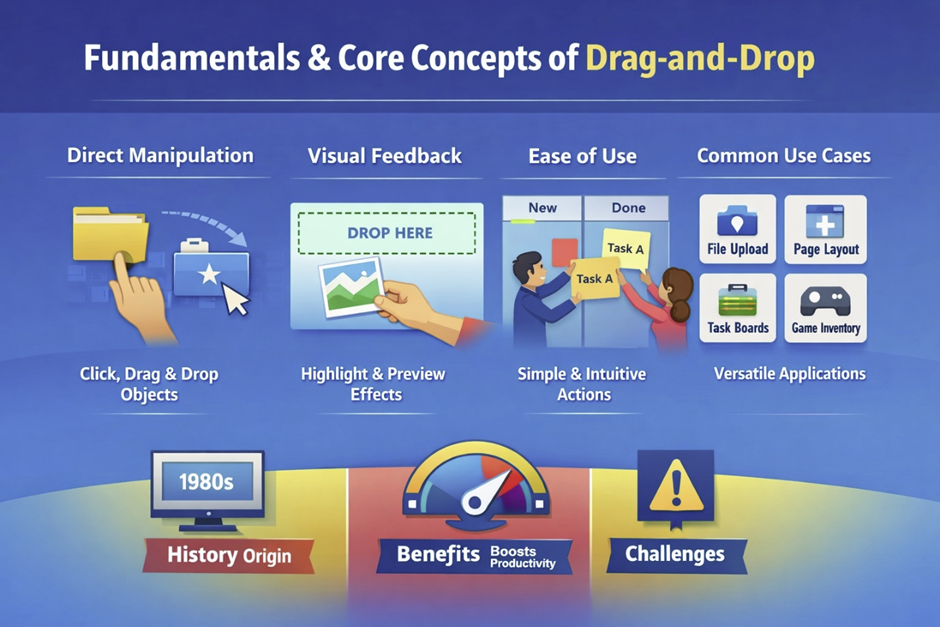
Drag-and-drop is a fundamental interaction technique that allows users to move digital objects across a screen using a pointer or touch input, often controlled with a mouse or alternative keyboard navigation. The concept is based on direct manipulation, where users interact with elements visually instead of typing commands. This approach became widely recognized in the 1980s, following research at Xerox PARC (California, USA), where scientists explored ways to make computing more accessible. One of the key contributors to this vision was Alan Kay, who believed computers should be intuitive tools for everyday people. Drag-and-drop simplifies complex operations such as file management, layout design, and content organization into a single motion. Instead of navigating menus, users can perform actions instantly by dragging items to a target location. Over time, this interaction became a standard feature in operating systems, web applications, and mobile platforms such as Windows, Linux, and MacOS. Today, it is deeply integrated into modern user interface systems and advanced GUI environments. Its success lies in its ability to mirror real-world actions in a digital environment.
Definition and Simple Explanation
Drag-and-drop is defined as a user interface action where an object is selected, moved, and released to trigger a specific function. The process begins when a user clicks or taps on an element, which activates it for movement. This interaction model was first explored in early graphical systems developed around 1973 at Xerox PARC (California, USA). Researchers like Larry Tesler contributed to making interfaces more human-centered by reducing reliance on complex commands. As the user moves the selected item, the system tracks its position and updates the interface in real time using system resources such as CPU, ram, and optimized processors. When the object is released, the system interprets the action and performs the corresponding task, such as moving or copying data. Visual feedback, such as highlighted areas or shadow effects, helps users understand the interaction. This method reduces cognitive load because users do not need to remember commands or instructions. It also supports faster learning, especially for beginners who are unfamiliar with technical systems. Drag-and-drop remains one of the clearest examples of direct manipulation in interface design.
Real-World Examples (Desktop, Mobile, Web)
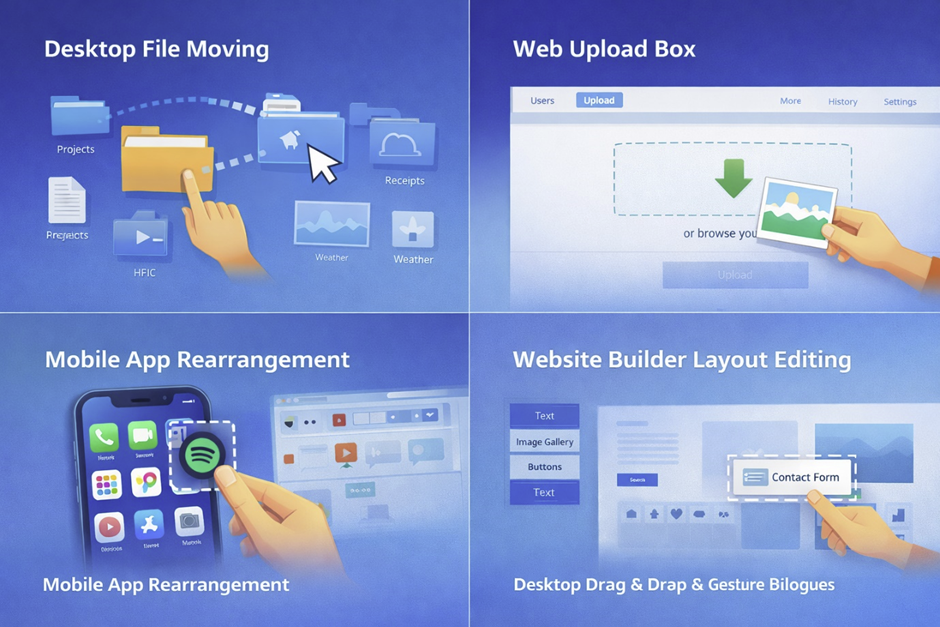
Drag-and-drop is widely used across different platforms, with each environment adapting the interaction to its own capabilities. On desktop systems like Microsoft Windows, users can drag files between folders or move items to the recycle bin, a feature that became mainstream with Windows 95. On macOS, drag-and-drop is used for organizing files, attaching documents to emails, and editing media content. In web environments, drag-and-drop is commonly seen in file upload systems, where users can drag images directly into a browser instead of selecting them manually. Platforms such as Google Drive use this feature to simplify how users upload files, including handling large files through cloud storage systems. On mobile devices powered by Android, manufacturers like Samsung, Sony, and Motorola helped popularize gesture-based drag interactions. Each platform modifies the behavior slightly, but the core idea remains consistent. These real-world examples demonstrate how versatile and adaptable drag-and-drop is.
Why Drag-and-Drop Became Popular
The popularity of drag-and-drop is closely linked to the shift from command-line interfaces to graphical environments in the 1980s. Early computer systems required users to memorize commands, which limited accessibility for non-technical users. Innovations at Xerox PARC (California, USA) introduced the idea of interacting with visual elements instead of text commands. This concept was later commercialized by Apple with the release of the 1984 Macintosh, which emphasized ease of use. Drag-and-drop played a central role in this transformation by allowing users to manipulate objects directly on the screen. It significantly improved efficiency, enabling tasks to be completed faster with fewer steps. The interaction also reduced errors, as users could visually confirm their actions before completing them. As software became more complex in the 1990s and 2000s, drag-and-drop provided a simple way to manage that complexity. Its intuitive nature made it accessible to users of all skill levels. Today, Today, it remains one of the most widely used interaction methods in digital interfaces and enterprise ecosystems supported by companies like IBM, HP, and Oracle.
History of Drag-and-Drop Interfaces
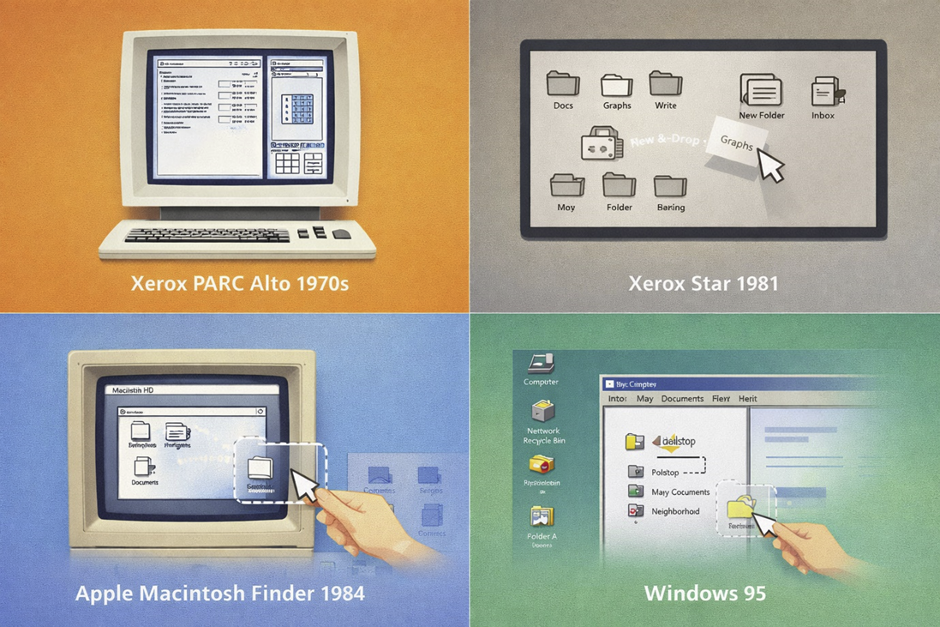
The development of drag-and-drop interfaces is deeply rooted in the evolution of graphical user interfaces, which transformed computing from text-based commands to visual interaction. This transformation began in the 1970s at Xerox PARC (California, USA), where researchers aimed to make computers more intuitive for everyday users. Instead of typing commands, users could interact with icons, windows, and on-screen objects. These ideas were revolutionary at the time and laid the foundation for modern interface design. Throughout the 1980s and 1990s, major technology companies refined and commercialized these concepts, bringing them into homes and offices worldwide. Drag-and-drop became a natural extension of direct manipulation, allowing users to physically “move" digital items. As computing expanded into the internet era in the 2000s, this interaction model adapted to new environments. It later evolved further with the rise of mobile devices and touchscreens in the 2010s. Today, drag-and-drop is a universal interaction method across all major platforms and is widely used in web development and modern programming environments.
Early GUI Systems and Origins
The earliest foundations of drag-and-drop emerged during experimental research into graphical interfaces in the 1970s at Xerox PARC (California, USA). One of the most influential systems developed during this time was the Xerox Alto in 1973, which introduced a mouse-driven interface with windows and icons. Visionaries like Alan Kay and Douglas Engelbart contributed to the idea that computers should be interactive and visually intuitive. These systems allowed users to select and manipulate objects directly on the screen, a concept known as direct manipulation. Although the Alto itself was not widely sold, it became a blueprint for future systems. In 1981, the Xerox Star further developed these ideas by introducing a desktop metaphor, where files and folders could be visually organized. This environment included early forms of object movement that resembled drag-and-drop interactions. The idea of moving items visually across the screen was inspired by physical office tasks, such as rearranging papers on a desk. These early implementations demonstrated that users could interact with digital content more naturally. The innovations from this period became the foundation for all modern drag-and-drop systems.
Adoption in Operating Systems
The transition of drag-and-drop from research labs to mainstream computing occurred in the 1980s, when commercial operating systems began adopting graphical interfaces. Apple Macintosh System Software, launched in 1984, was one of the first systems to fully integrate drag-and-drop into everyday use. Under the leadership of Steve Jobs, Apple focused on making computers accessible to non-experts, and drag-and-drop played a central role in that goal. Users could move files, organize folders, and delete items simply by dragging icons across the screen. This eliminated the need for complex commands and made computing more approachable. Later, Microsoft Windows expanded these capabilities, especially with the release of Windows 95, which introduced a more refined graphical interface. Microsoft’s approach brought drag-and-drop to a global audience, standardizing it as a core interaction method. Over time, additional features were added, such as dragging files between applications and external devices. These advancements made drag-and-drop an essential part of daily computer use. The adoption by major operating systems ensured its long-term success and widespread use.
Expansion into Web and Mobile Applications
The expansion of drag-and-drop into web and mobile platforms marked a new phase in its evolution. A major milestone occurred in 2009 with HTML5, which introduced standardized drag-and-drop functionality. Companies like Google integrated these features into web applications. This allowed users to upload files and organize content efficiently. In many systems, files such as PDF documents may include security layers like a password. On the security side, systems must also protect against threats like virus, trojan, using antivirus solutions. Modern implementations often rely on compression techniques for faster data handling and require proper system administration for stability.
How Drag-and-Drop Works (Technical Overview)
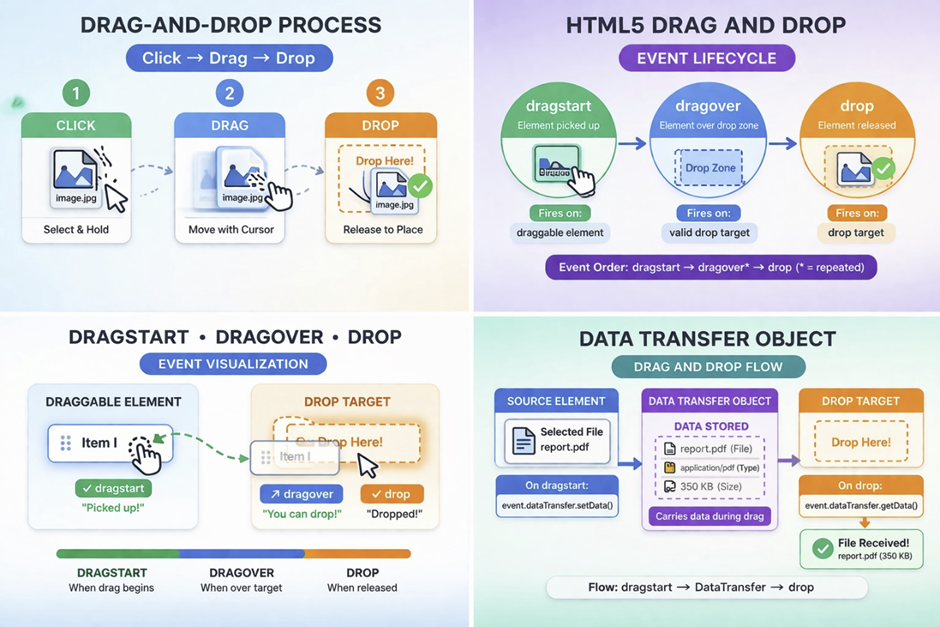
The technical foundation of drag-and-drop is based on event-driven programming, where user actions trigger a sequence of system responses. This model became more standardized with the introduction of HTML5 in 2009, which defined how browsers should handle drag-and-drop interactions. The process involves detecting input events such as mouse clicks or touch gestures and translating them into object movement on the screen. Behind the scenes, the system continuously tracks cursor position and updates the interface in real time using optimized CPU performance and efficient ram usage. This interaction relies on multiple coordinated components, including event listeners, rendering engines, and data transfer mechanisms. Early concepts of event-driven interaction can be traced back to research at Xerox PARC (California, USA) in the 1970s, where graphical systems began responding dynamically to user input. Modern implementations are far more complex, supporting cross-application communication and advanced UI feedback. Developers use JavaScript and browser APIs to control each phase of the interaction, often supported by web development frameworks. Understanding this technical workflow is essential for building responsive and efficient applications.
Basic Mechanism (Click → Drag → Drop)
The core mechanism of drag-and-drop follows a three-step interaction model: click, drag, and drop. When a user presses a mouse button or touches the screen, the system registers the initial selection of an element. This step activates the object and prepares it for movement within the interface. As the user moves the pointer or finger, the system continuously updates the position of the selected element, often rendering a visual representation such as a floating or semi-transparent version. This real-time feedback ensures that users can track the object’s movement accurately. The dragging phase involves constant communication between the input device and the rendering engine, powered by modern processors for smooth performance. When the user releases the input, the system triggers the drop action, completing the interaction. At this point, the application determines what operation should occur, such as moving or copying the item. This mechanism is designed to feel natural by mimicking physical actions. Its simplicity hides a complex underlying system of event handling and rendering.
Event Lifecycle
The drag-and-drop interaction is governed by a structured lifecycle of events that occur in a specific sequence. The first stage, known as drag start, is triggered when the user begins moving an element after selecting it. This event initializes the process and allows the system to identify the data being transferred. As the user moves the object across the interface, the drag over phase occurs repeatedly whenever the item passes over potential drop targets. During this stage, the system evaluates whether the location can accept the item and may provide visual indicators such as highlighting. The final stage, drop, is triggered when the user releases the object at a valid target location. At this point, the application executes the intended action, such as inserting or relocating content. This lifecycle model became standardized with modern web technologies in the late 2000s and is often implemented using languages like Python in backend logic for complex systems. Developers can customize each stage to control how the interaction behaves. Understanding this sequence is critical for creating smooth and predictable user experiences.
DOM Events in Web Development
In web development, drag-and-drop functionality is implemented through specific DOM events that allow precise control over user interactions. The most important events include dragstart, dragover, and drop, which were formalized as part of the HTML5 specification in 2009. The dragstart event is triggered when a user begins dragging an element, allowing developers to define the data and behavior associated with the action. The dragover event occurs continuously as the dragged item moves over potential drop targets, and it must be handled correctly to enable dropping. Developers often prevent the default behavior during this event to allow custom functionality. The drop event is triggered when the user releases the element, signaling the completion of the interaction. At this stage, the application processes the transferred data and updates the interface accordingly. These events provide a flexible framework for building interactive applications. Modern JavaScript frameworks often extend these native events to simplify implementation. Mastering DOM events is essential for developing advanced drag-and-drop features. Modern frameworks simplify implementation and often integrate with enterprise ecosystems from companies like Oracle.
Data Transfer Object Explained
The data transfer object plays a central role in enabling communication during drag-and-drop interactions. It is created when the drag operation begins and is used to store information about the item being moved. This object allows developers to define the type of data being transferred, such as plain text, HTML content, or files. For example, when dragging a file into a browser, the data transfer object contains metadata about that file. It also defines what operations are allowed, such as copy, move, or link actions. This concept became standardized with the introduction of HTML5 in 2009, providing a consistent way to handle data across browsers. Developers can access and modify this object during different stages of the drag-and-drop lifecycle. Proper use of the data transfer object ensures that interactions are both functional and secure. It also enables complex scenarios, such as transferring data between different applications or components. Understanding this object is essential for building robust drag-and-drop systems.
Types of Drag-and-Drop Interactions
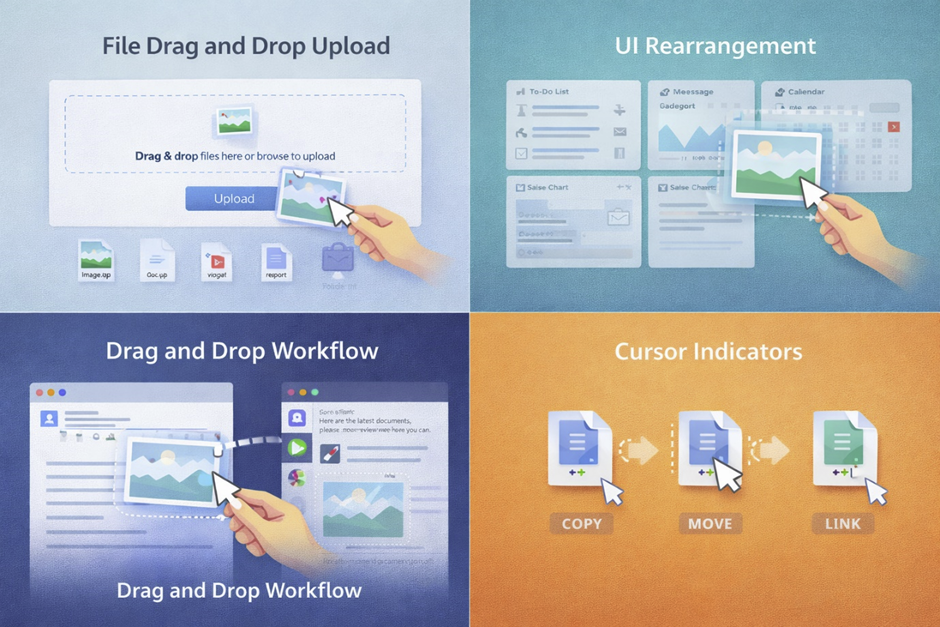
Drag-and-drop interactions can be categorized into multiple types depending on their purpose and behavior within a system. These variations began evolving after graphical interfaces became mainstream in the 1990s, particularly in operating systems developed in USA and Europe. Each type represents a different way users interact with digital objects, from simple file movement to complex cross-application workflows. The diversity of these interactions reflects the flexibility of drag-and-drop as a design pattern. Over time, developers have expanded its functionality to support advanced use cases such as real-time collaboration and cloud synchronization. Modern systems rely on clearly defined interaction types to ensure consistency and usability. Understanding these categories helps developers design more intuitive interfaces. It also allows users to predict outcomes more accurately. Each type contributes to making digital environments more interactive and efficient.
File Drag-and-Drop
File drag-and-drop is the most traditional and widely recognized form of this interaction. It allows users to move files between folders, drives, or applications without using menus. This feature became dominant after 1995 with the widespread adoption of graphical operating systems. Users can drag documents, images, or videos directly into applications or storage systems. In professional environments, this interaction is essential for managing large datasets efficiently. It also supports batch operations, where multiple files can be moved at once. File drag-and-drop reduces the need for navigation through complex directory structures. This method is commonly used in cloud storage platforms and desktop environments. It also plays a key role in content management systems. Its reliability and simplicity make it one of the most important interaction types.
UI Element Rearrangement
UI element rearrangement focuses on organizing interface components dynamically. This interaction allows users to customize layouts by moving elements such as cards, widgets, or lists. It became popular with the rise of interactive web applications in the early 2000s. Systems designed for productivity often rely on this feature to improve workflow efficiency. Users can prioritize information by rearranging elements based on their needs. This type of drag-and-drop is commonly used in dashboards and kanban-style boards. It enhances user control over the interface without requiring technical knowledge. Visual placeholders often indicate where elements will be placed. This reduces confusion and improves accuracy during interaction. UI rearrangement plays a major role in personalization and usability.
Data Transfer Between Applications
This type of interaction enables users to move data across different applications seamlessly. It became more advanced with improvements in operating systems during the 2010s. Users can drag content such as text, images, or files from one program into another. This eliminates the need for intermediate steps like copying and pasting manually. It is particularly useful in creative and professional workflows. Cross-application drag-and-drop relies on compatibility between software systems. Modern platforms support this functionality through shared data formats. This interaction improves productivity by streamlining tasks. It also reduces the time required to complete complex operations. Its importance continues to grow with the expansion of multi-app environments.
Copy vs Move vs Link Actions
Drag-and-drop actions can perform different operations depending on context and system settings. These include copying, moving, or linking items between locations. This behavior was standardized in operating systems during the 1990s. A move action transfers the original item, while a copy creates a duplicate. A link action creates a reference rather than duplicating data. Systems often provide visual indicators to show which action will occur. Modifier keys can change the behavior dynamically during interaction. Understanding these differences helps prevent errors such as accidental deletion. These actions add flexibility to drag-and-drop functionality. They allow users to control how data is handled during interactions. This versatility is a key strength of the drag-and-drop model.
Drag-and-Drop in Different Platforms
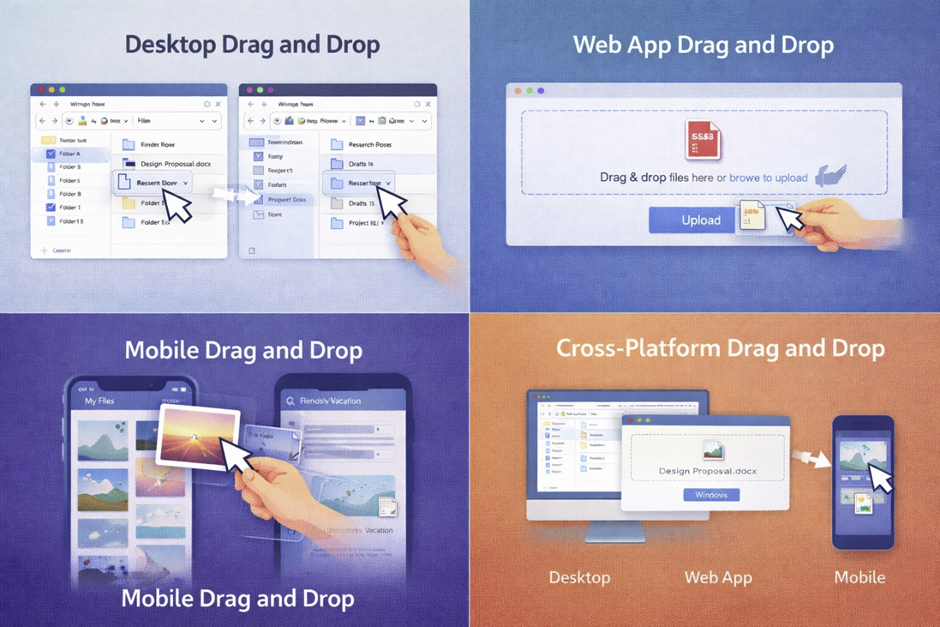
Drag-and-drop behavior varies significantly across platforms due to differences in input methods and system capabilities. While the concept originated in desktop environments in the 1980s, it has since expanded into web and mobile ecosystems. Each platform introduces unique challenges that influence how drag-and-drop is implemented. Desktop systems prioritize precision and control, while mobile platforms focus on gesture-based interaction. Web applications must balance performance and browser compatibility. These differences require developers to adapt their designs accordingly. Despite these variations, the core interaction remains consistent across platforms. Users still perform the same fundamental action of moving objects visually. Understanding platform-specific behavior is essential for creating effective interfaces. It ensures a consistent user experience across devices. These systems are developed by major companies like Microsoft and adapted across environments including Linux and Android. Understanding platform-specific behavior is essential.
Desktop Applications
Desktop environments provide the most precise and feature-rich drag-and-drop experience. This is due to the use of input devices like a mouse and keyboard. Since the 1980s, desktop systems have refined this interaction to support complex workflows. Users can perform detailed actions such as organizing files and editing content. The availability of modifier keys adds flexibility to interactions. Desktop systems also support multi-window drag-and-drop operations. This allows users to move data between applications easily. High screen resolution improves accuracy and usability. These features make desktop platforms ideal for professional tasks. Drag-and-drop remains a core interaction method in desktop computing.
Web Applications
Web-based drag-and-drop relies on browser technologies and scripting languages. It became widely adopted after the introduction of HTML5 in 2009. Developers use APIs and JavaScript to create interactive experiences. Web implementations must handle performance limitations and compatibility issues. Despite these challenges, modern web apps offer advanced drag-and-drop features. These include file uploads, layout editing, and data organization. Visual feedback plays a crucial role in guiding users. Web applications often use libraries to simplify development. This interaction has made web tools more powerful and user-friendly. It bridges the gap between desktop and online experiences.
Mobile Interfaces (Touch Gestures)
Mobile drag-and-drop is based on touch gestures rather than pointer devices. This interaction became mainstream with smartphones in the late 2000s. Users perform actions by tapping and holding elements before dragging them. Mobile interfaces must account for limited screen space and precision. Designers use larger touch targets to improve usability. Gesture conflicts, such as scrolling, must be carefully managed. Recent advancements have enabled cross-app drag-and-drop on mobile devices. This allows users to transfer data between apps seamlessly. Mobile implementations continue to evolve with new technologies. Drag-and-drop is now a key feature in mobile user experience design.
Key Components of Drag-and-Drop UI
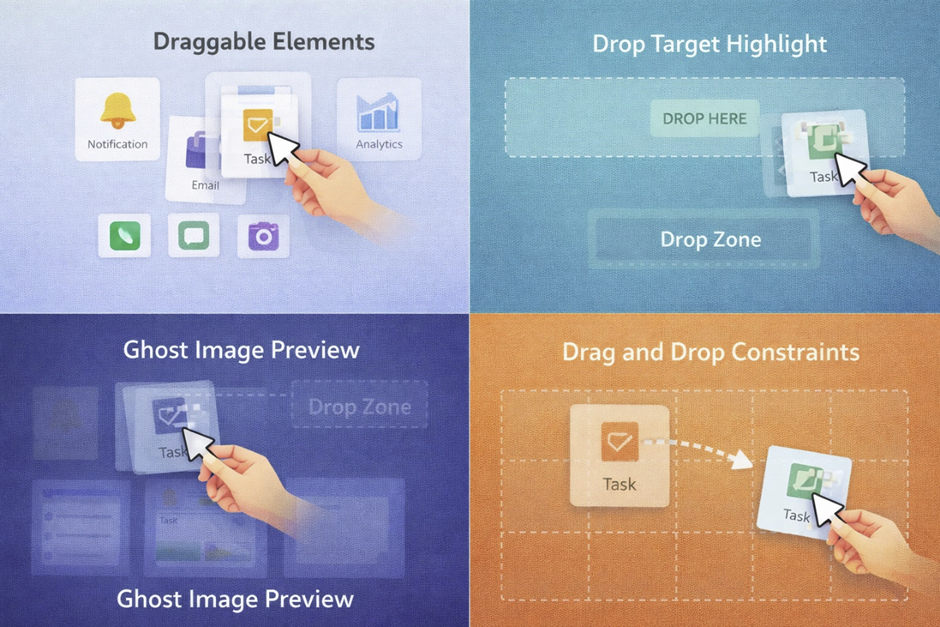
A well-designed drag-and-drop interface relies on several core components that work together to create a smooth experience. These elements were refined over decades of interface design, starting from early GUI systems in the 1970s. Each component plays a specific role in ensuring usability and functionality. Without proper implementation, drag-and-drop interactions can become confusing or unreliable. Developers must carefully design each part to provide clear feedback and control. These components also help maintain consistency across different platforms. Understanding these building blocks is essential for effective UI design. They form the foundation of all drag-and-drop systems. Proper implementation leads to a more intuitive user experience.
Draggable Elements
Draggable elements are the objects that users can select and move within an interface. These can include files, icons, cards, or UI components. The concept of draggable objects dates back to early GUI experiments in the 1970s. Designers must clearly indicate which elements are draggable. This is often done through visual cues such as icons or hover effects. Draggable elements must respond quickly to user input. Delays can reduce usability and cause frustration. These elements often include metadata that defines their behavior. Developers must ensure they are accessible and functional across devices. Proper design of draggable elements is essential for a smooth interaction.
Drop Targets
Drop targets are the areas where dragged elements can be placed. These targets must be clearly defined to guide user interaction. Visual indicators such as highlighting help users identify valid drop zones. Drop targets can represent folders, containers, or action areas. They play a critical role in determining the outcome of the interaction. Developers must ensure that drop targets are responsive and accurate. Invalid drop zones should provide clear feedback to users. This prevents confusion and improves usability. Drop targets are essential for completing drag-and-drop actions successfully.
Visual Feedback (Ghost Images, Highlights)
Visual feedback helps users understand what is happening during a drag-and-drop interaction. This includes ghost images, highlights, and animations. Ghost images are semi-transparent representations of the dragged object. They provide a visual reference during movement. Highlights indicate valid drop targets. These cues reduce errors and improve user confidence. Feedback must be immediate and responsive. Delays can make the interaction feel unresponsive. Visual feedback is essential for guiding user behavior. It enhances both usability and satisfaction.
Constraints and Boundaries
Constraints define the limits of drag-and-drop interactions. These include boundaries, rules, and restrictions on movement. Constraints prevent users from performing invalid actions. They are essential for maintaining system integrity. Developers can define constraints based on layout or functionality. Boundaries ensure that elements stay within designated areas. This is especially important in grid-based systems. Constraints also improve usability by reducing errors. Proper implementation ensures a controlled and predictable interaction.
Advantages of Drag-and-Drop
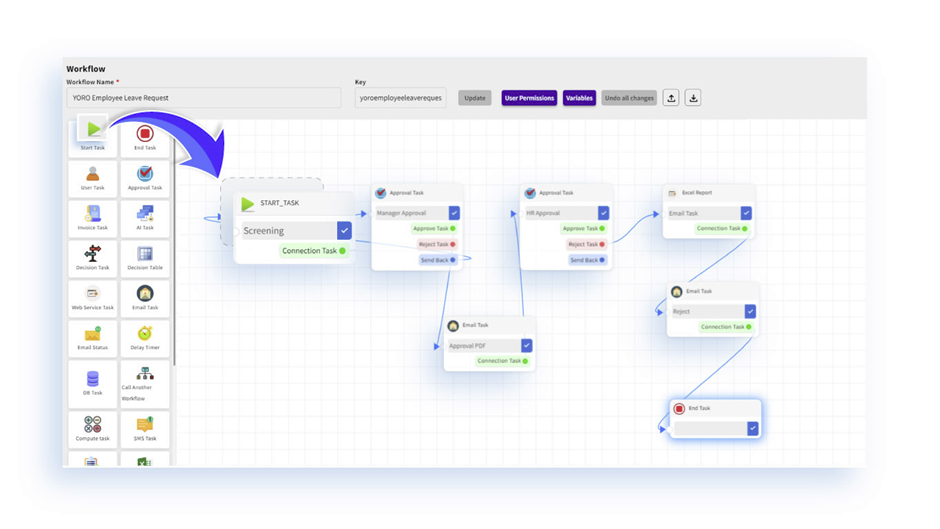
Drag-and-drop has become one of the most widely adopted interaction methods because of its strong usability benefits. Its development aligns with the broader evolution of user-friendly computing that began in the 1980s in California, USA. This interaction reduces complexity by allowing users to perform actions visually instead of relying on commands. Over time, it has proven to increase productivity and improve user satisfaction across different platforms. Designers often prefer drag-and-drop because it supports direct manipulation, which feels natural to users. It also reduces the number of steps required to complete tasks. Many modern applications rely heavily on this interaction to simplify workflows. Its advantages extend to both beginners and advanced users. Understanding these benefits helps explain why drag-and-drop remains a core part of interface design today.
Intuitive User Experience
One of the biggest strengths of drag-and-drop is its intuitive nature, which makes it easy for users to understand. This concept was influenced by early research into human-computer interaction in the 1970s. Instead of learning commands, users interact with visual elements directly. This reduces the cognitive effort required to perform tasks. The interaction mimics real-world actions, such as moving objects from one place to another. This familiarity helps users adapt quickly to new systems. Even first-time users can understand how to use drag-and-drop without instructions. Visual cues further enhance this intuitive experience. Designers often use this method to simplify complex systems. It plays a major role in improving overall usability.
Faster Task Completion
Drag-and-drop significantly speeds up task execution by reducing the number of steps involved. Instead of navigating menus or entering commands, users can complete actions in a single motion. This efficiency became particularly important during the expansion of office software in the 1990s. Tasks such as file organization, content editing, and layout design can be performed quickly. The interaction minimizes interruptions in workflow. It also reduces the time spent searching for options in menus. This leads to increased productivity, especially in professional environments. Many applications rely on drag-and-drop to streamline operations. Faster task completion is one of the key reasons for its widespread adoption.
Reduced Learning Curve
Drag-and-drop lowers the barrier to entry for new users by simplifying interactions. This was a major goal of early GUI designers in the 1980s. Users do not need prior technical knowledge to perform basic tasks. The visual nature of the interaction makes it easy to understand. Training time is significantly reduced compared to command-based systems. This is especially important in educational and consumer applications. Users can learn by doing rather than reading instructions. The consistency of drag-and-drop across platforms also helps users transfer skills easily. This makes it a universal interaction method. A reduced learning curve contributes to better user retention and satisfaction.